
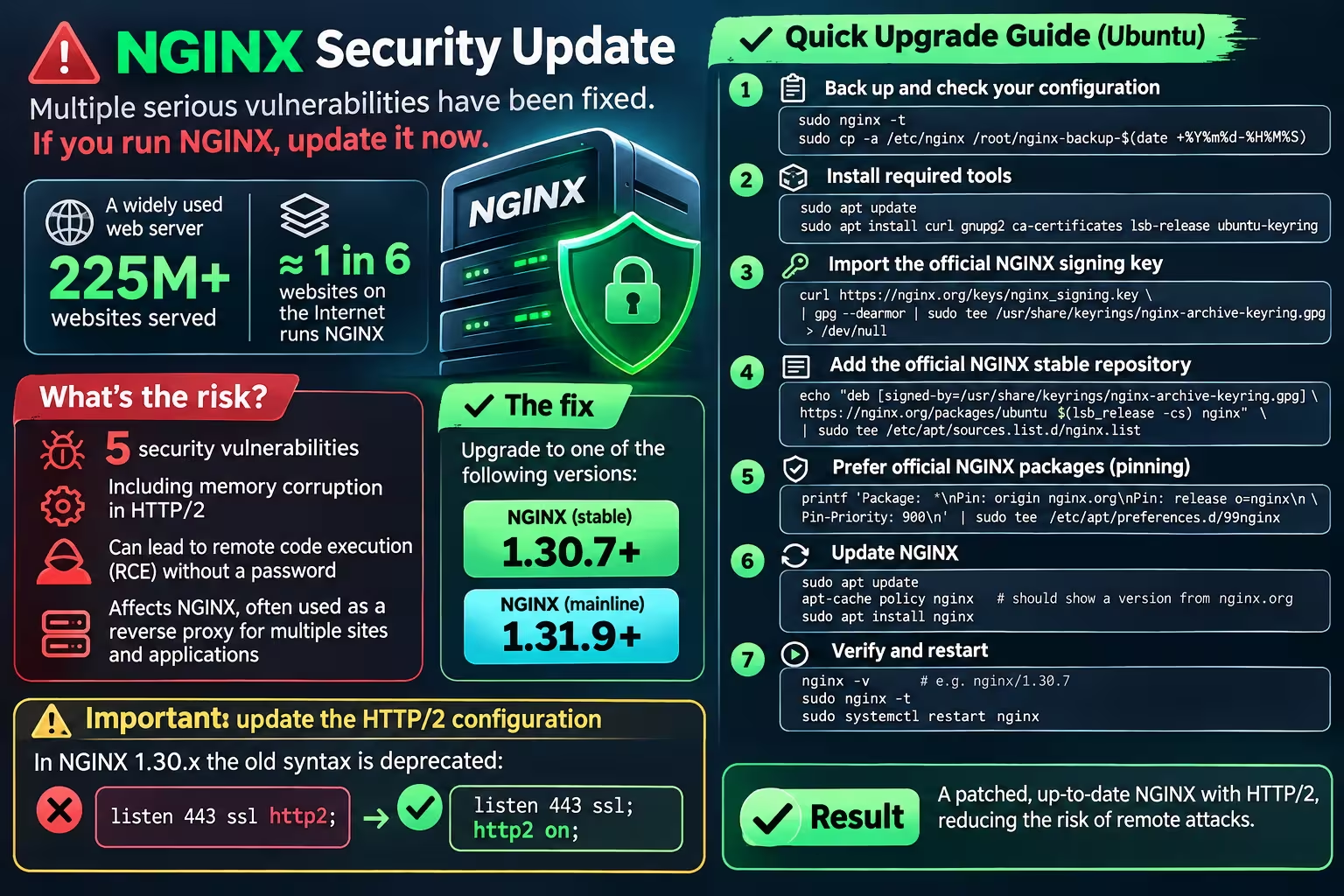
On November 18, 2026, NGINX released NGINX 1.30.7 stable and NGINX 1.31.9 mainline, addressing multiple security vulnerabilities affecting HTTP/2, HTTP/3, TLS 1.3, the resolver, stream modules, the PROXY protocol, and other parts of NGINX.
The official NGINX security advisory lists ten vulnerabilities fixed in these releases. Among the most important are memory corruption in HTTP/2 flow control, use-after-free issues in HTTP/2 and HTTP/3, and a denial-of-service condition involving TLS 1.3.
For Internet-facing production servers, this is a security update that should not be postponed.
Why this update matters
One of the most serious issues is CVE-2026-123007, a vulnerability in HTTP/2 flow control.
According to Ubuntu’s security assessment, specially crafted traffic can cause a heap buffer overflow in an NGINX worker process. The result may be a worker crash, memory corruption, and under certain conditions potentially remote code execution.
Ubuntu currently assigns this issue a high priority and lists Ubuntu LTS as vulnerable.
Another important issue is CVE-2026-118899, affecting NGINX configurations using TLS 1.3. A specially crafted TLS connection can cause an NGINX worker to enter an infinite loop while reading a request body, resulting in denial of service.
Ubuntu also currently lists Ubuntu LTS as vulnerable to this issue.
NGINX identifies the following versions as patched:
Stable branch: NGINX 1.30.7 or later
Mainline branch: NGINX 1.31.9 or later
For a production server where stability is the priority, I chose the 1.30.7 stable branch.
Important note about Ubuntu package versions
Ubuntu often backports security patches without changing the upstream software version.
Therefore, seeing:
nginx/1.24.0
does not automatically mean that every historical NGINX vulnerability is still present.
However, at the time of this update, Ubuntu still classified the newly disclosed November 2026 vulnerabilities as affecting Ubuntu. For systems that need the upstream fixes immediately, one option is to move from the Ubuntu NGINX package to the official NGINX stable repository.
The procedure below shows how I upgraded an Ubuntu server from:
nginx/1.24.0 (Ubuntu)
to:
nginx/1.30.7
Step 1 — Validate and back up the existing configuration
Before changing packages, verify that the current configuration is valid:
sudo nginx -tCreate a complete backup:
sudo cp -a /etc/nginx \
  /root/nginx-backup-$(date +%Y%m%d-%H%M%S)
It is also useful to save the effective configuration:
sudo nginx -T > /root/nginx-full-config-before-upgrade.txtSave information about the current NGINX build and installed modules:
nginx -V 2>&1 | tee /root/nginx-version-before.txtCheck installed NGINX packages:
dpkg -l | grep -E 'nginx|libnginx-mod'This is important because switching from Ubuntu packages to packages provided directly by NGINX may change how optional dynamic modules are packaged.
Step 2 — Install the required tools
Install the packages required for adding the official repository:
sudo apt update

sudo apt install \
  curl \
  gnupg2 \
  ca-certificates \
  lsb-release \
  ubuntu-keyring
Step 3 — Import the official NGINX signing key
To prevent social platforms from rewriting URLs inside commands, the hostname can be stored in a variable:
NGINX_HOST="nginx.org"Download the official signing key:
curl "https://${NGINX_HOST}/keys/nginx_signing.key" \
  | gpg --dearmor \
  | sudo tee /usr/share/keyrings/nginx-archive-keyring.gpg >/dev/null
Verify the key:
gpg --dry-run \
  --quiet \
  --no-keyring \
  --import \
  --import-options import-show \
  /usr/share/keyrings/nginx-archive-keyring.gpg
The output should contain the official NGINX signing-key fingerprint:
573BFD6B3D8FBC641079A6ABABF5BD827BD9BF62
NGINX publishes this fingerprint in its official package installation documentation.
Step 4 — Add the official stable NGINX repository
Add the stable repository:
echo "deb [signed-by=/usr/share/keyrings/nginx-archive-keyring.gpg] https://${NGINX_HOST}/packages/ubuntu $(lsb_release -cs) nginx" \
  | sudo tee /etc/apt/sources.list.d/nginx.list
Then configure APT to prefer packages supplied by NGINX:
printf 'Package: *\nPin: origin nginx.org\nPin: release o=nginx\nPin-Priority: 900\n' \
  | sudo tee /etc/apt/preferences.d/99nginx
A pin priority of 900 is the configuration recommended in the official NGINX package documentation.
Step 5 — Check the candidate version before installing
Update the package index:
sudo apt updateCheck which version APT plans to install:
apt-cache policy nginxFor this security update, the candidate should be at least:
1.30.7
For example:
Installed: 1.24.0-2ubuntu7.19
Candidate: 1.30.7-1~noble
Do not install an older version if the purpose of the upgrade is to address the November 2026 vulnerabilities.
Step 6 — Simulate the upgrade
Before modifying the production server, simulate the transaction:
sudo apt -s install nginxReview carefully which packages APT intends to remove.
A migration from the Ubuntu package may remove:
nginx-common
because the official nginx.org package uses a different packaging structure.
However, if APT plans to remove required packages such as:
libnginx-mod-*
verify that equivalent modules are available before continuing.
Step 7 — Install NGINX 1.30.7
Install the new package:
sudo apt install nginxIf the installer detects that /etc/nginx/nginx.conf has been modified, it may ask whether the file should be replaced.
For a server with an existing customized production configuration, choose:
Keep the currently installed version
This preserves the existing virtual hosts, TLS configuration, proxy settings and security hardening.
Step 8 — Verify the new version
Check the installed version:
nginx -vThe expected result is:
nginx version: nginx/1.30.7Then validate the configuration:
sudo nginx -tOnly continue if NGINX reports:
syntax is ok
test is successful
Restart NGINX:
sudo systemctl restart nginxVerify the service:
sudo systemctl status nginx --no-pagerStep 9 — Update the deprecated HTTP/2 configuration syntax
After upgrading from NGINX 1.24 to NGINX 1.30, you may see warnings similar to:
the "listen ... http2" directive is deprecated,
use the "http2" directive instead
Older configuration:
listen 443 ssl http2;For current NGINX versions, use:
listen 443 ssl;
http2 on;
For IPv4 and IPv6:
listen 443 ssl;
listen [::]:443 ssl;

http2 on;
Search all configurations for the old syntax:
grep -Rns "listen .*http2" \
  /etc/nginx/sites-enabled \
  /etc/nginx/sites-available \
  /etc/nginx/conf.d
After updating the files:
sudo nginx -t
sudo systemctl reload nginx
Step 10 — Verify that HTTP/2 is actually working
A successful syntax check does not necessarily prove that HTTP/2 negotiation works.
You can test the local NGINX origin directly:
openssl s_client \
  -connect 127.0.0.1:443 \
  -servername example.com \
  -alpn h2 </dev/null 2>/dev/null \
  | grep -a -i "ALPN protocol"
Expected output:
ALPN protocol: h2This confirms that the server successfully negotiates HTTP/2 through ALPN.
Step 11 — Verify the package source
Finally:
apt-cache policy nginxA correctly configured server using the official stable repository should show something similar to:
Installed: 1.30.7-1~noble
Candidate: 1.30.7-1~noble
with the package coming from the official NGINX repository and a priority of:
900
This ensures future stable NGINX packages can be installed through the normal APT workflow.
What if you cannot upgrade immediately?
Disabling HTTP/2 can temporarily reduce exposure to vulnerabilities that specifically require HTTP/2.
For current NGINX syntax:
listen 443 ssl;

# http2 on;
Similarly, temporarily disabling TLS 1.3 can reduce exposure to CVE-2026-118899:
ssl_protocols TLSv1.2;However, these measures address only specific attack paths.
They do not fix all of the vulnerabilities included in the November 2026 security release.
Upgrading to a patched NGINX version remains the recommended solution.
Final result
After the migration, the production configuration can remain essentially the same while the underlying NGINX version moves from:
NGINX 1.24.0
to:
NGINX 1.30.7 stable
with:
• HTTP/2 enabled using the current configuration syntax
• TLS 1.2 and TLS 1.3 available
• existing virtual hosts preserved
• existing reverse-proxy configuration preserved
• security fixes from the November 2026 release applied
• future NGINX stable updates available through APT
Infrastructure components such as NGINX are part of the security boundary of every application behind them.
Updating the application while leaving an Internet-facing reverse proxy vulnerable leaves an important part of that boundary exposed.
For production environments, always validate configuration compatibility, package dependencies and dynamic modules before upgrading.







Leave A Comment