
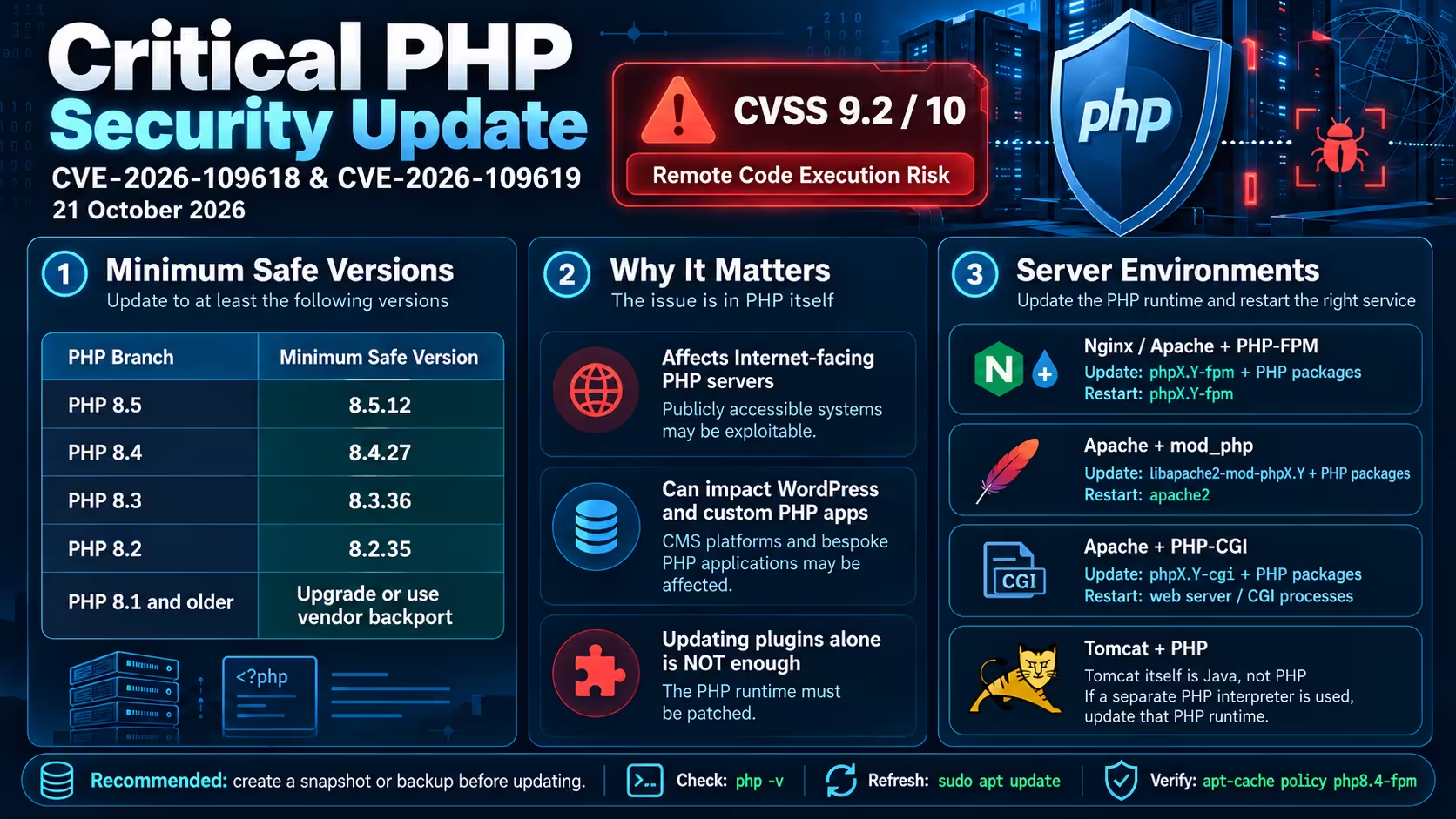
Published: October 22, 2026 | Severity: Critical — CVSS 9.2/10
On October 21, 2026, the PHP Security Team released emergency updates addressing CVE-2026-109618 and CVE-2026-109619.
These critical vulnerabilities may allow unauthenticated remote code execution (RCE). The issue affects PHP itself, regardless of the application framework or content management system.
Important: Apache with mod_php is considered particularly high-risk. Updating WordPress, Drupal, Joomla or other applications alone does not fix these PHP vulnerabilities.
1. Minimum Patched PHP Versions
| PHP Branch | Minimum Patched Version |
|---|---|
| PHP 8.5 | 8.5.12 |
| PHP 8.4 | 8.4.27 |
| PHP 8.3 | 8.3.36 |
| PHP 8.2 | 8.2.35 |
| PHP 8.1 and older | Upgrade or obtain vendor security backports |
Linux distributions may provide backported security fixes without adopting the latest upstream version number.
2. Identify Your PHP Environment
These commands apply to Ubuntu/Debian installations using APT packages.
Check the PHP command-line version:
php -vIdentify the installed PHP components:
dpkg -l | grep -E 'php[0-9]|libapache2-mod-php'For Apache, check the enabled modules:
apache2ctl -M | grep -E 'php_module|proxy_fcgi'php_module— PHP is loaded directly through Apachemod_php.proxy_fcgi_module— Apache supports FastCGI and may be configured to use PHP-FPM.- Nginx commonly uses PHP-FPM as its PHP execution backend.
Check the corresponding runtime version, for example:
php-fpm8.4 -v
php-cgi8.4 -v
Only run commands for components actually installed on your server.
3. Update PHP on Ubuntu/Debian
Step 1 — Back up your server and PHP configuration.
Create a snapshot or verified backup first.
Step 2 — Refresh available packages.
sudo apt updateIf APT reports repository errors, resolve them before upgrading.
Choose your installed PHP branch (8.2, 8.3, 8.4 or 8.5):
PHP_BRANCH=8.4Check available package versions:
apt-cache policy \
  php${PHP_BRANCH}-fpm \
  libapache2-mod-php${PHP_BRANCH} \
  php${PHP_BRANCH}-cgi
Confirm that the available packages include the relevant security fixes.
Step 3 — Identify and update installed PHP packages.
mapfile -t PHP_PACKAGES < <(
  dpkg-query -W \
    -f='${db:Status-Abbrev} ${binary:Package}\n' \
    "php${PHP_BRANCH}*" \
    "libapache2-mod-php${PHP_BRANCH}" 2>/dev/null |
  awk '$1 == "ii" {print $2}' |
  sort -u
)

printf '%s\n' "${PHP_PACKAGES[@]}"
Check the proposed changes before installation:
sudo apt-get -s install \
  --only-upgrade "${PHP_PACKAGES[@]}"
If the correct security update is available, the package list is nonempty, and the simulation shows no unexpected changes:
sudo apt-get install \
  --only-upgrade "${PHP_PACKAGES[@]}"
This updates the selected branch and its installed versioned components, including PHP-FPM, CGI, Apache modules and extensions where present.
4. Restart the Correct Service
The required restart depends on your environment.
Nginx + PHP-FPM
sudo systemctl restart php8.4-fpmApache + PHP-FPM
sudo systemctl restart php8.4-fpmApache + mod_php
sudo apachectl configtest
sudo systemctl restart apache2
Apache + PHP-CGI
Ensure the updated CGI interpreter is used, then restart or recycle the relevant web server workers according to your CGI configuration.
Apache Tomcat + PHP
Apache Tomcat is a Java Servlet container, not a native PHP execution engine.
If Tomcat hosts only Java applications, these PHP vulnerabilities do not directly affect Tomcat.
If PHP is integrated through CGI or a separate PHP backend, update that PHP installation. Restart the relevant PHP or CGI processes as required. A Tomcat restart alone does not patch PHP.
Avoid enabling Tomcat’s CGI Servlet merely to add PHP support. CGI is disabled by default for security reasons.
5. Verify the Update
For example, on PHP 8.4:
php -v
php-fpm8.4 -v
For Apache mod_php, verify the updated package:
dpkg-query -W libapache2-mod-php8.4
apache2ctl -M | grep php_module
For PHP-CGI:
php-cgi8.4 -vVerify the service status and test your applications.
Remember: the CLI version may differ from the PHP runtime serving actual HTTP requests.
Security Recommendations
- Apply vendor security fixes immediately.
- Keep backups before updating production servers.
- Check all installed PHP runtimes, including multiple versions and containerized deployments.
- Retain existing
php.inicustomizations unless a specific change is required. - Do not treat temporary mitigations as replacements for patching.
- Prefer PHP-FPM over
mod_phpfor new Apache deployments. - Plan to move away from PHP 8.2 before its end of life on December 31, 2026.
The web server name does not determine PHP security. The PHP runtime processing HTTP requests must be patched.








Leave A Comment